Hackathon web app
Employees open the app, import Outlook Calendar activity, review the draft, and submit approved entries to Tempo. It is deployed with one engineering team.
Internal Product · PM + Developer · 2026
Turn a weekly memory exercise into a daily moment of confirmation.
I built a human-in-the-loop web app that turns calendar and Jira context into employee-approved Tempo entries, deployed it with one engineering team, and am now developing a Teams-based second iteration.
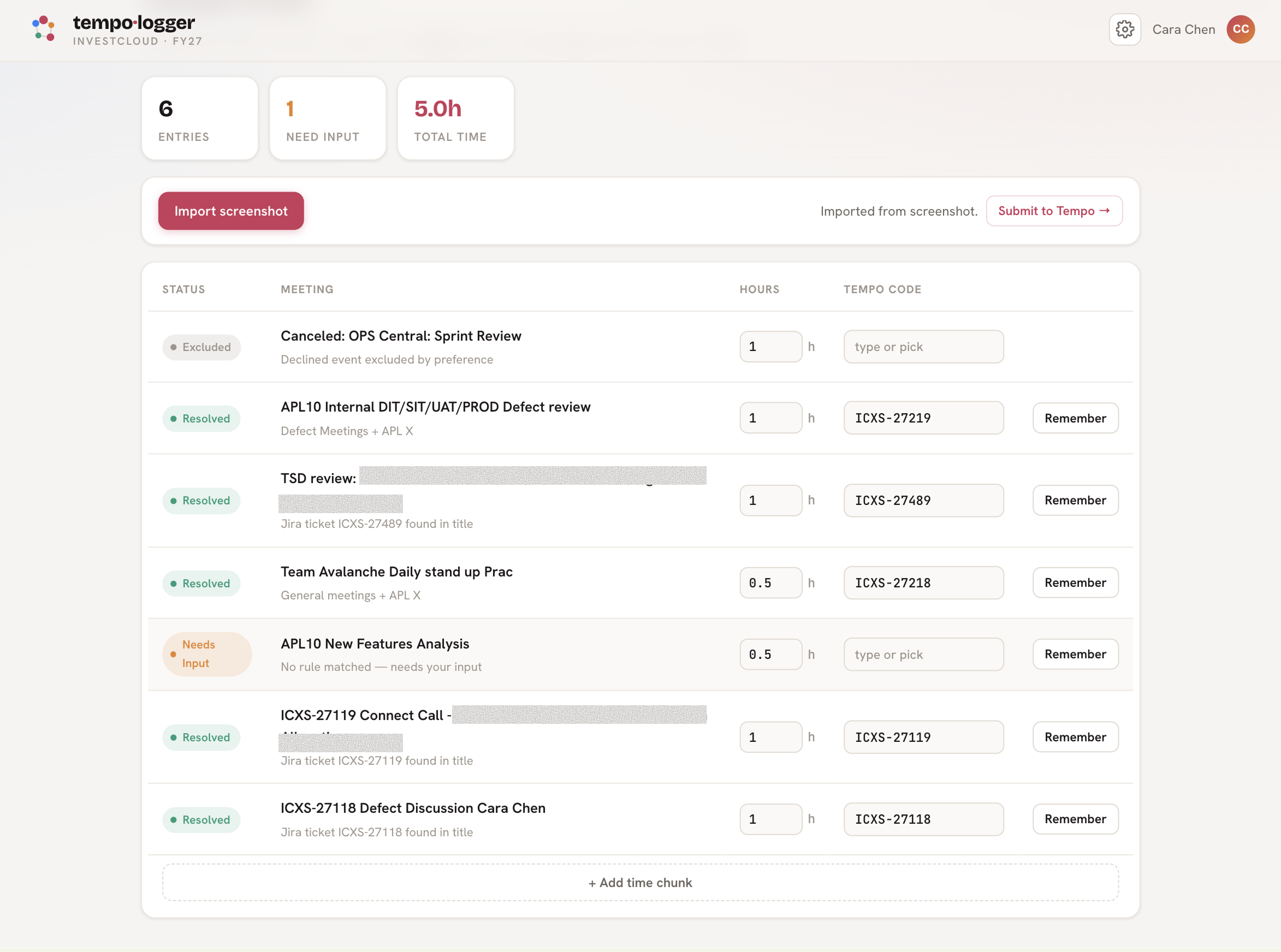
Employees open the app, import Outlook Calendar activity, review the draft, and submit approved entries to Tempo. It is deployed with one engineering team.
I am gathering feedback and interviews while building a daily Teams reminder that brings the review to the employee.
I presented the solution to the SVPs of Operations and Finance and the CFO. Operations asked to pursue implementation after the hackathon.
More than 400 employees logged work across over 80 time codes. To complete a timesheet, they reconstructed meetings and Jira activity, selected the correct codes, and entered each record into Tempo. Because the task offered little immediate value to salaried employees, many delayed it until the end of the week, when context had already faded.
People rebuilt a week after context had faded. With little personal incentive, the work became a late and frustrating box-checking exercise.
Finance needed actual hours for client billing. Management needed credible project-level effort for planning, cost, and efficiency decisions.
The opportunity was not simply a faster form. It was to use systems that already contained the day’s context, create a draft, and ask the employee to confirm it while the work was still fresh.
“Do not ask people to remember work the system has already observed.”
— Product framingBuilt withClaude Code · Claude Haiku · Microsoft 365 / Outlook · Jira · Tempo
For the hackathon, I used screenshot import to simulate Microsoft Graph input while building and testing the mapping and review workflow. In the deployed version, an employee opens the web app and imports Outlook Calendar activity before reviewing and submitting to Tempo.
Calendar and Jira context removed much of the manual code entry. High-confidence mappings could be proposed automatically, while uncertain entries remained editable.
Feedback and submission timing showed that reducing effort alone did not solve accuracy. The separate destination preserved the original behavioral problem.
I decided to move the review into Microsoft Teams and deliver it near the end of the workday, when employees can still recall what they did. At roughly 6 p.m., the assistant summarizes the day. The employee approves the draft in chat or edits an exception before it is logged to Tempo.
Concept mockup for the Teams iteration currently being built; it is not presented as a shipped interface.
The system uses deterministic rules wherever possible and invokes AI only when the available context cannot produce a reliable mapping. This keeps the workflow explainable, limits cost, and makes uncertainty visible.
Microsoft Graph and Jira are read-only context sources. Tempo receives only employee-approved entries. The pilot also needs to test overlapping meetings, non-calendar work, notification fatigue, and the difference between a scheduled meeting and actual billable effort.
400 employees × 10 minutes of daily timesheet administration.
400 employees × 2 minutes for review and exception handling.
54 hours saved × 250 workdays × $60 fully loaded hourly cost.
The deeper value is better operational data: more timely worklogs for client billing, fewer missing submissions for finance to chase, and a more credible view of project effort for management.
“The first iteration automated reconstruction. The second addressed behavior.”
— Product lessonReducing clicks was not enough while the employee still had to remember to begin. For recurring operational workflows, delivery timing and channel are part of the product—not implementation details.
Savings are a directional business-case estimate from the hackathon model, not a measured realized outcome.